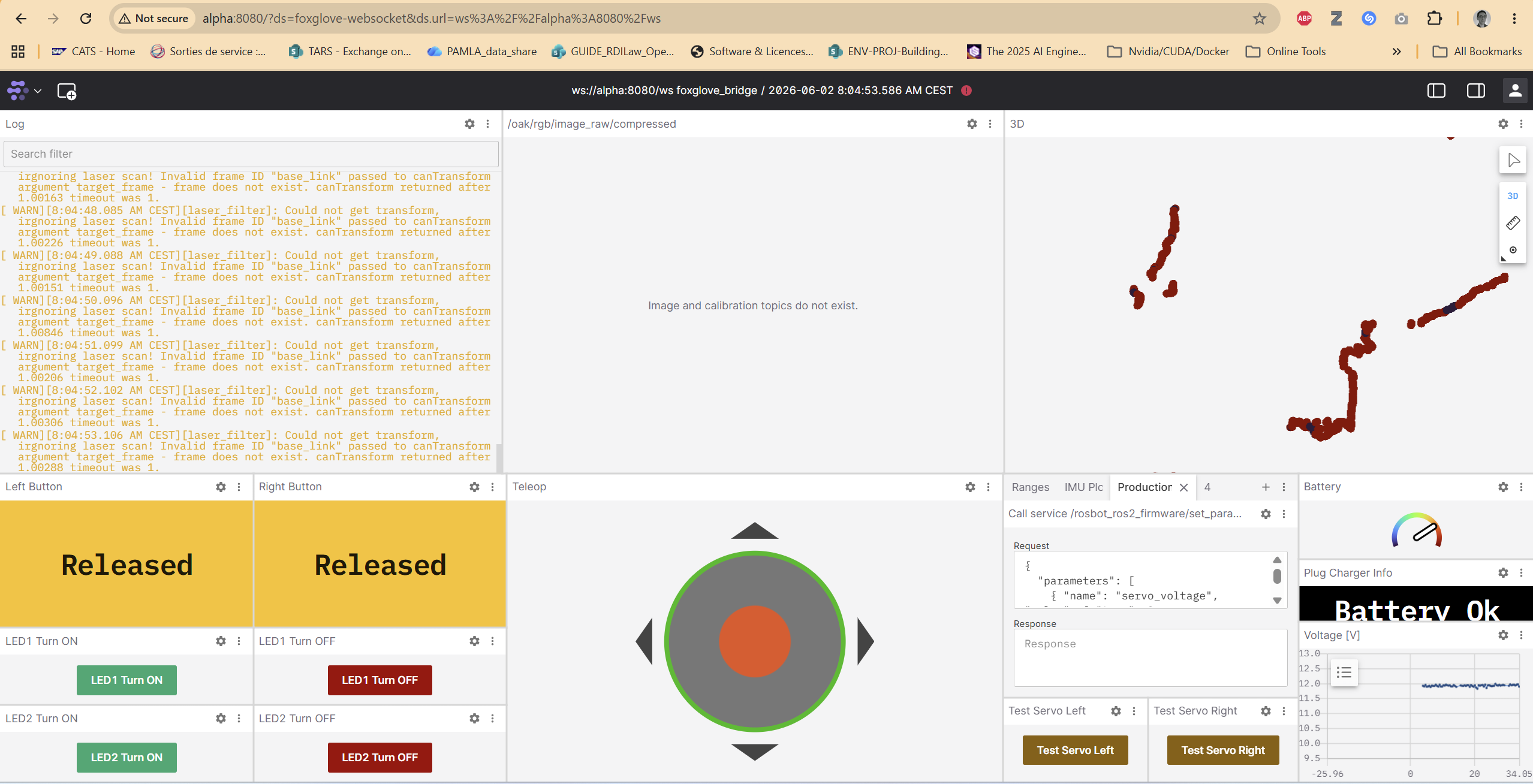
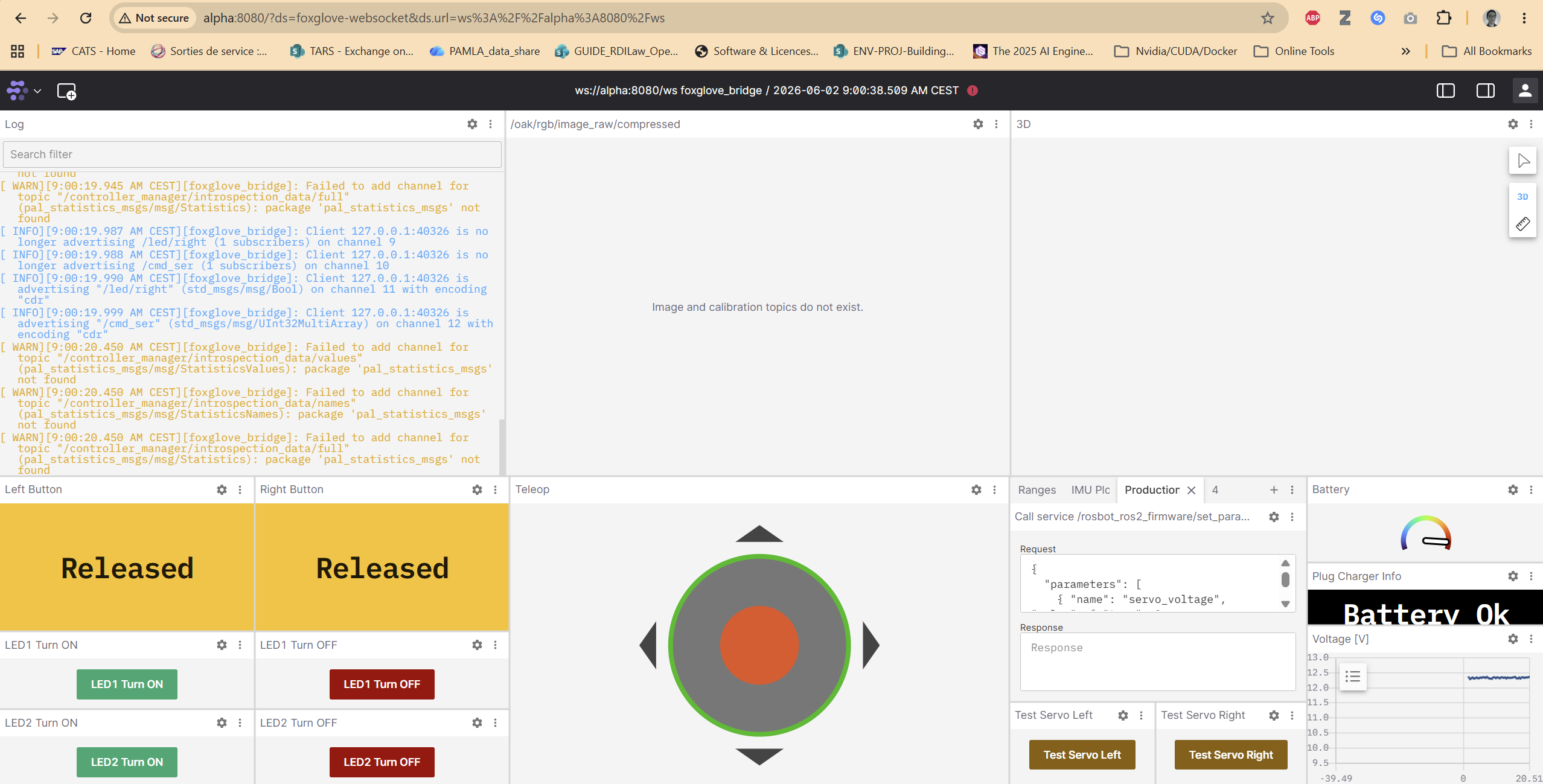
As complementary information, rplidar has the same inactive status:
husarion@alpha:~/Documents/rosbot-autonomy$ snap services husarion-rplidar
Service                  Startup  Current   Notes
husarion-rplidar.daemon  enabled  inactive  -

husarion@alpha:~/Documents/rosbot-autonomy$ snap info husarion-rplidar
name:      husarion-rplidar
summary:   RPLIDAR ROS 2 driver for Husarion robots
publisher: Husarion✓
store-url: https://snapcraft.io/husarion-rplidar
contact:   https://github.com/husarion/husarion-rplidar-snap/issues
license:   Apache-2.0
description: |
  The `husarion-rplidar` snap contains all the necessary software to bring the RPLIDAR LIDARS up.

  **Parameters**

  The snap provides the following configurable parameters (`param name`: `default value`):

  * `configuratin`: `custom`
  * `driver`: `{...}`
  * `ros`: `{...}`

  The `ros` contains the following keys:

  * `ros.domain-id`: `0` - Sets the `ROS_DOMAIN_ID` environment variable for the ROS driver.
  * `ros.localhost-only`: `0` - Sets the `ROS_LOCALHOST_ONLY` environment variable for the ROS
  driver.
  * `ros.transport`: `udp` - Configures DDS transport. Options are `udp`, `shm`, `builtin` (or
  `rmw_fastrtps_cpp`), `rmw_cyclonedds_cpp`. Corresponding DDS XML files can be found in the
  `/var/snap/rosbot-xl/common` directory (custom FastDDS setups can also be created here).
  * `ros.namespace`: `(unset)` - Namespace for all topics and transforms.

  The `driver` contains the following keys:

  * `channel-type`: `serial`
  * `serial-port`: `auto`
  * `serial-baudrate`: `256000`
  * `frame-id`: `laser`
  * `inverted`: `false`
  * `angle-compensate`: `true`
  * `scan-mode`: `(unset)`
  * `device-namespace`: `(unset)`

  To set the parameters, use the snap set command, e.g.,

     snap set husarion-rplidar driver.device-namespace=front_lidar
commands:
  - husarion-rplidar
  - husarion-rplidar.start
  - husarion-rplidar.stop
services:
  husarion-rplidar.daemon: simple, enabled, inactive
snap-id:      w8lK1AlBRZZAq5ARR4IBkAwiOqkldsYA
tracking:     jazzy/stable
refresh-date: today at 09:40 CEST
channels:
  humble/stable:    2.1.4+git4.gd71b45d 2025-03-22 (40) 53.0MB -
  humble/candidate: ↑
  humble/beta:      ↑
  humble/edge:      2.1.4+git7.g24cc9b6 2026-05-29 (46) 56.3MB -
  jazzy/stable:     2.1.4+git4.gd71b45d 2025-03-22 (41) 67.2MB -
  jazzy/candidate:  ↑
  jazzy/beta:       ↑
  jazzy/edge:       2.1.4+git7.g24cc9b6 2026-05-29 (47) 70.1MB -
installed:          2.1.4+git4.gd71b45d            (41) 67.2MB -
This problem seems to have a similar root cause:
husarion@alpha:~/Documents/rosbot-autonomy$ journalctl -u snap.husarion-rplidar.daemon.service -b | grep -iE 'symbol|died'
Jun 01 09:49:09 alpha husarion-rplidar.daemon[2266]: [rplidar_node-1] /snap/husarion-rplidar/41/opt/ros/snap/lib/rplidar_ros/rplidar_node: symbol lookup error: /snap/husarion-rplidar/41/opt/ros/underlay_ws/opt/ros/jazzy/lib/libfastrtps.so.2.14: undefined symbol: _ZN8eprosima7fastcdr3Cdr9serializeERKh
If that can be of any help tracing the problem, I was frequently running/deactivating the rosbot-autonomy stack using just start-navigation and just stop (the main branch here: GitHub - husarion/rosbot-autonomy at main · GitHub).
This has been working perfectly for months until recently, all of a sudden. Please let me add this, it may be useful too:
husarion@alpha:~/Documents/rosbot-autonomy$ snap info rosbot
name:      rosbot
summary:   A driver for ROSbot mobile robot
publisher: Husarion✓
store-url: https://snapcraft.io/rosbot
contact:   https://husarion.com/
license:   Apache-2.0
description: |
  **Description**

  The **rosbot** snap includes all the essential software required to operate the ROSbot, including
  the controller, robot state publisher, and more. The snap is dedicated for: ROSbot XL, ROSbot 3 /
  3 PRO, ROSbot 2R / 2 PRO.
  The snap is based on https://github.com/husarion/rosbot_ros package, which provides the ROS 2
  driver for the ROSbot mobile robot.

  **Installation**

  To install this snap on the Single Board Computer (SBC) within the ROSbot run the following
  command:

     snap install rosbot
     sudo /var/snap/rosbot/common/post_install.sh
     sudo rosbot.flash

  **Usage**

  After installation, you need to specify robot-model by running:

     sudo snap set rosbot driver.robot-model=rosbot/rosbot-xl

  You can start the ROSbot driver by running:

     sudo rosbot.start

  After that robot is operational and you can control it using by sending commands to the `/cmd_vel`
  topic. For example, you can use the `teleop_twist_keyboard` node to control the robot from a
  terminal:

    sudo rosbot.teleop

  or you can connect a Logitech F710 USB dongle to the ROSbot's USB port to control the robot.
  Remember to set gamepad in `X` mode and keep pressing the LB button on the gamepad to enable
  control.

  **Parameters**

  The snap provides the following configurable parameters:

  * `driver`: `{...}`
  * `ros`: `{...}`

  The `ros` contains the following keys:

  * `ros.domain-id`: `0` - Sets the `ROS_DOMAIN_ID` ROS 2 env.
  * `ros.localhost-only`: `0` - Sets the `ROS_LOCALHOST_ONLY` ROS 2 env.
  * `ros.transport`: `udp` - Configures DDS transport. Options are `udp`, `shm`, `builtin` (or
  `rmw_fastrtps_cpp`), `rmw_cyclonedds_cpp`. Corresponding DDS XML files can be found in the
  `/var/snap/rosbot/common` directory (custom FastDDS setups can also be created here).
  * `ros.namespace`: `` - Namespace for all topics and transforms.

  The `driver` contains the following keys:

  * `driver.configuration`: `basic` - Specify robot configuration. This parameter affects URDF and
  starts the manipulator. `rosbot` has only `basic` configuration. `rosbot-xl` has: `basic`,
  `telepresence`, `autonomy`, `manipulation`, `manipulation-pro`.
  * `driver.mecanum`: `True/False` (depend on robot-model) - switches between mecanum or
  differential drive controller.
  * `driver.robot-model`: `` - Allows you to select the robot model (options: `rosbot`,
  `rosbot-xl`).
  * `driver.serial-port`: `auto` - Serial port for firmware (e.g., `/dev/ttyUSB0`).

  To set parameters, use:

     snap set rosbot driver.mecanum=True

  **Available Apps (Main)**

  * `rosbot.flash` - Flash firmware for the STM32F4 microcontroller.
  * `rosbot.start` - Start the daemon running the ROSbot ROS 2 driver.
  * `rosbot.stop` - Stop the daemon running the ROSbot ROS 2 driver.
  * `rosbot.teleop` - Run the `teleop_twist_keyboard` node to control the robot from a terminal.

  **Auxiliary Apps**

  * `rosbot.config-ftdi` - Set up the CBUS pins in the FTDI chip (used with RST and BOOT0 pins in
  STM32); needs to be done only once.
  * `rosbot.print-serial-number` - Print the CPU ID and serial number of ROSbot.
  * `rosbot.reset-stm32` - Reset the STM32F4 microcontroller.

  **Working with ROS Parameters**

  For multiple snaps running ROS 2 or host-snap-Docker communication, useful files and scripts are
  available in `/var/snap/rosbot/common/`.

  Example usage:

     # Set parameters in the rosbot snap
     sudo snap set rosbot ros.transport=udp ros.namespace=abc

     # Mirror the setup for other ROS 2 snaps
     sudo snap set husarion-depthai $(xargs -a  /var/snap/rosbot/common/ros_snap_args)
     sudo snap set husarion-rplidar $(xargs -a  /var/snap/rosbot/common/ros_snap_args)

     # Set up the current shell with the same configurations
     source /var/snap/rosbot/common/ros.env

     # Install configurations
     /var/snap/rosbot/common/manage_ros_env.sh
     source ~/.bashrc

     ros2 run teleop_twist_keyboard teleop_twist_keyboard --ros-args --remap __ns:=/${ROS_NAMESPACE}
commands:
  - rosbot.arm-activate
  - rosbot.arm-disactivate
  - rosbot.config-ftdi
  - rosbot.flash
  - rosbot.print-serial-number
  - rosbot.reset-stm32
  - rosbot.restart
  - rosbot
  - rosbot.start
  - rosbot.stop
  - rosbot.teleop
services:
  rosbot.daemon:    simple, enabled, active
  rosbot.db-server: simple, enabled, active
snap-id:      IX8kZXHijORI92kMSVoEOPuSNVxr59CP
tracking:     jazzy/stable
refresh-date: today at 09:39 CEST
channels:
  humble/stable:    0.15.1        2025-07-24 (223) 427MB -
  humble/candidate: ↑
  humble/beta:      ↑
  humble/edge:      0.15.2        2025-10-14 (231) 428MB -
  jazzy/stable:     0.16.1        2025-07-24 (225) 480MB -
  jazzy/candidate:  ↑
  jazzy/beta:       ↑
  jazzy/edge:       1.0.0-247b329 2026-05-30 (326) 543MB -
installed:          0.16.1                   (225) 480MB -