Hello, I am using the Rosbot-XL with a Jetson Nano and with dockers, and I’m trying to customize the LED strip.
On your manual you say these LEDs are programmables, but I can’t find any section that explains how it works and neither any topic in the driver’s docker that is led-related.
Is there any tutorial or info you can offer on that matter?
Thanks.
Hello @javioled,
This project has been frozen and has not been released.
You can find a demo of how to do this in this repository. The changes include both the firmware and the code controlling the LEDs from ROS.
Regards
Thank you, I flashed the firmware and the leds work great!
But now, I launched the navigation node and seems to be a problem with the robot’s orientation.
When I send it a command to turn left the robot turns left, but in rviz2 the robot turns right, making the lidar signal not correlate and impossible to navigate. And this problem appeared since I changed the firmware to this new one.
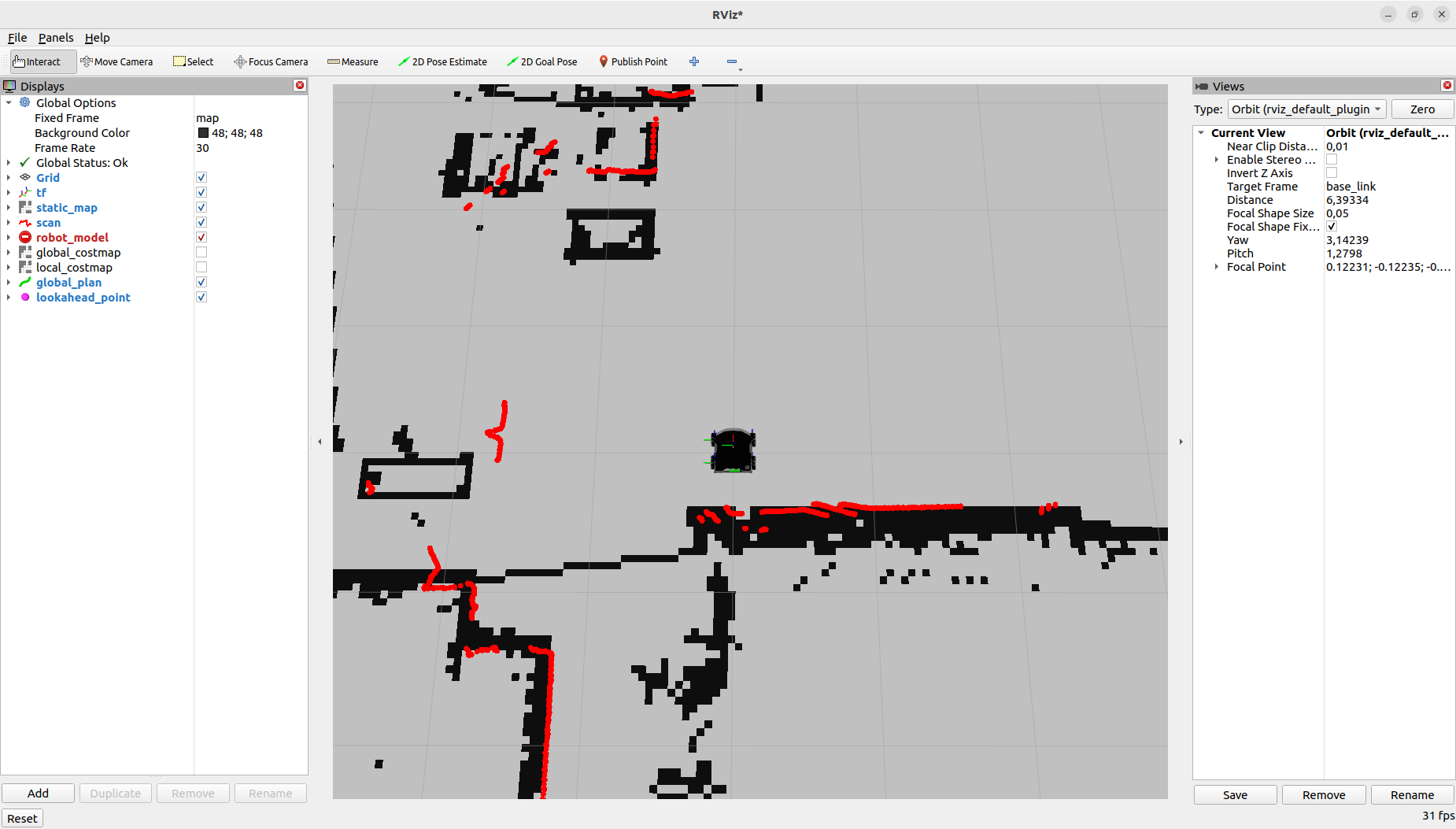
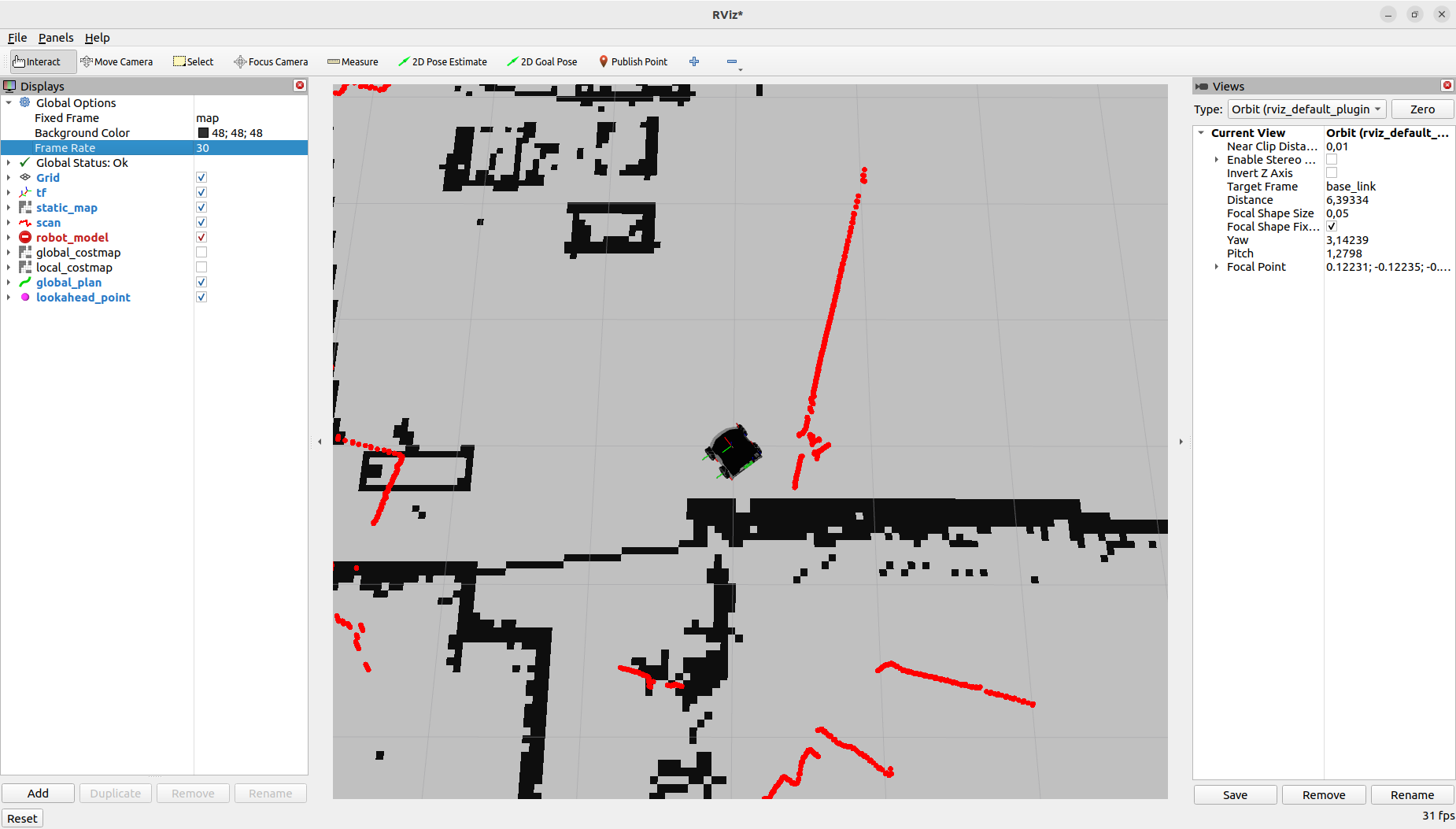
As you can see, i turned the robot to the right, but the robot turned in rviz to the left, making the lidar not match with the map.
The firmware version that I was using before was: husarion/rosbot-xl:humble-0.8.12-20231219 and the navigation and orientation worked flawlessly in that version.
Regards.
Hi @javioled,
Thank you for reporting this.
As of today, however, I don’t have a ready-made solution. The repo I sent is a quick demonstration that isn’t distributed or tested with our robots. We plan to add this logic in the future, but it’s hard to give a specific date.
Since the problem only started after the firmware update, I can suggest the following solutions:
- Locally build the rosbot_ros repository and correct the order of data used to create the imu_broadcaster topic. rosbot_hardware_interfaces/src/rosbot_imu_sensor.cpp at main · husarion/rosbot_hardware_interfaces · GitHub (simpler, but cannot use rosbot snap)
- Change the IMU sending order in GitHub - husarion/rosbot_xl_firmware at new-led-support . Build and upload the firmware again. (The more difficult part requires building the firmware, but you can use the rosbot snap)
If you could find the cause, I’d be grateful for the information. From what I can see, this firmware doesn’t differ in the IMU-related code, so I wouldn’t expect the behavior described:
@RafalGorecki The problem is not only associated with this firmware; it also occurs prior to the update to this version. The main issue is that the problems are very stochastic. Sometimes, they resolve by flashing the firmware and restarting the robot; other times, simply restarting the robot multiple times does the trick, but the number of restarts needed is never consistent. We suspect that the order of launching the containers may be a factor. We have control it, but that did not yield any results.
To be able to help, I’d need to understand your situation better and the situations in which errors occur.
I’ve tried to reproduce your case several times. As I understand it, this isn’t about driving the robot, but rather reading data from the magnetometer. It might be worth checking if there’s a strong magnetic field somewhere in the laboratory that could interfere with the orientation reading.
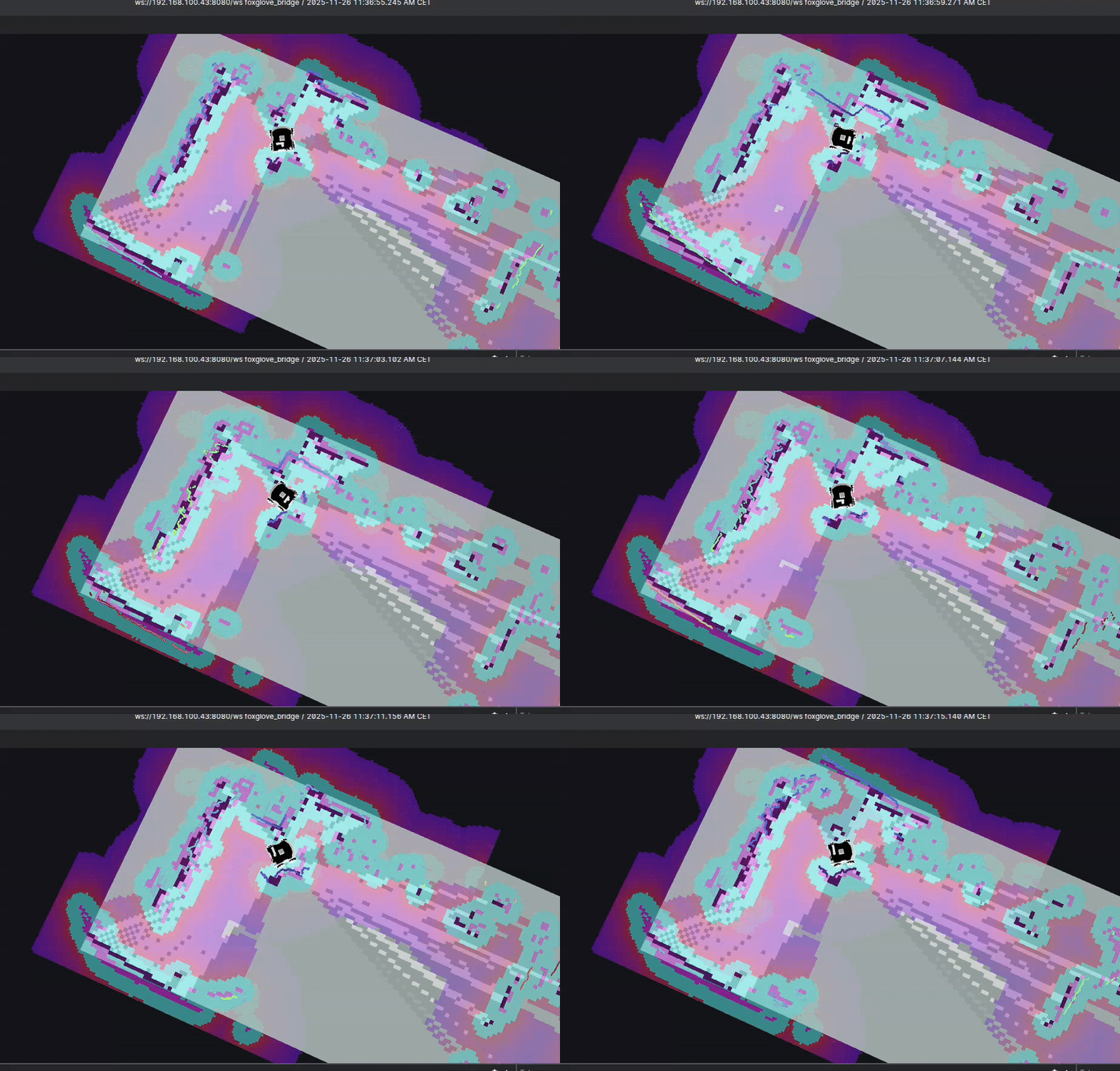
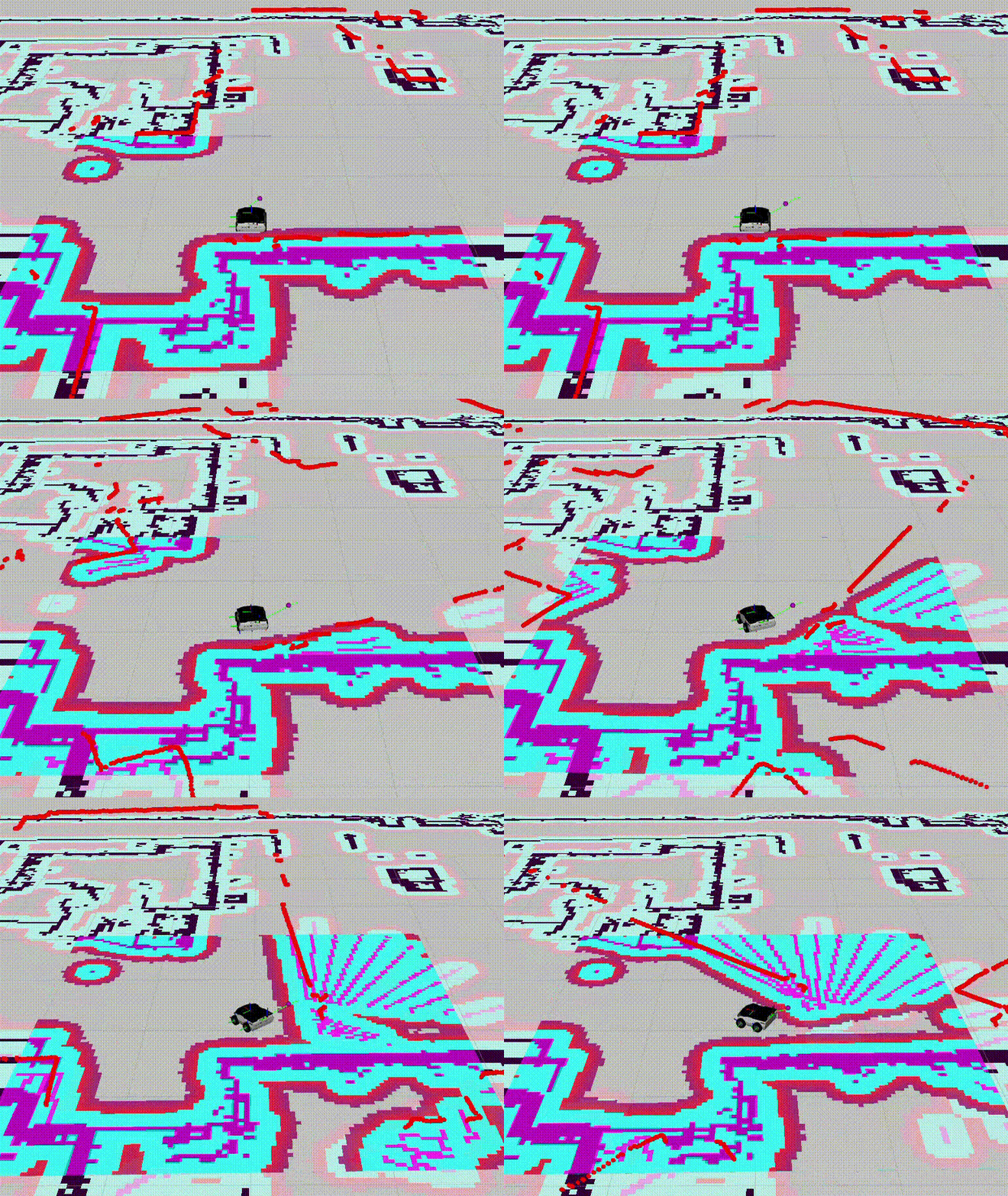
Here I show you a video of the rosbot-xl running via docker and sending it to a point on its right.
The robot physically moves indeed to the right, but in rviz it shows that it moves to the left, causing it to contradict its sensor’s data from the real data it reeds.
A visual example for your better understanding is the wall on its back: the robot physically turns to the right, making the wall be on its right, but the robot publish that he is turning left, so the wall, on its map is on its left, but the lidar reads a wall on its right (hope I made myself clear).
It’s purely a sign inversion on the z axis, but it affects all the navigation.
Another important thing is that sometimes it goes inverted as you can see in the video, but another times, doing the exact same thing in the same environment, it goes just fine.
Sometimes we restart the MCU and it solves it, another times just by turning down the dockers and up again… There is no pattern.
We suspect that it has something to do with the imu controller and the docker launch, because its the only stochastic factor due to the threads.
Please provide information regarding the platform and software:
- SBC: (Rpi/NUC/Jestson)
- ROS driver distro and version (custom configuration if modified) : (docker/rosbot snap/rosbot_xl snap (deprecated) + distro and version)
- Demo navigation and configuration:
- Husarion OS version (
echo $HUSARION_OS_VERSION): - Does the problem occur from the beginning, after starting the demo, or does it occur during the demo?
- The problem does not seem to be related to navigation, do you observe similar behavior without navigation?
Recommended:
- The latest ROS driver is provided as a rosbot snap
- Navigation: rosbot-autonomy main branch (soon to be the default branch for both ROSbot 3 and ROSbot XL): GitHub - husarion/rosbot-autonomy: Autonomous navigation & mapping for ROSbot 2R / 2 PRO
Tests:
Run everything and, if a problem occurs, check the data in the following topics:
odometry/filtered(if the orientation is incorrect, alsoimu_broadcaster/imuandrosbot_base_controller/odom)
SBC: Jetson Nano
ROS distro: ros2 humble via docker
Demo navigation (image versions): husarion/rosbot-xl:humble-0.10.0-20240202, husarion/micro-xrce-agent:v2.4.1, husarion/rplidar:humble, husarion/navigation2:humble-arm64-from-sourece.
Husarion OS version: The variable $HUSARION_OS_VERSION doesn’t seem to exist
The problem occur from the beginning we launch the docker. If the docker launches good, it goes well until the end, but when we turn the dockers down to make some changes and turn them back up, sometimes it launches great again, and sometimes it launches wrongly like the video shows.
On that cases we’ve tried to reboot the robot completely, reset the firmware, download the docker images again… and none of that seems to solve the problem consistently (sometimes it fixes after rebooting the robot, others by turning back on the dockers, but there’s no pattern).
No, I don’t think it has nothing to be with the navigation node but with the imu controller.
When the robot launches wrongly, the topics imu_broadcaster and odom publish the orientation inverted (just as rviz2 shows), but the robot turns correctly.
Thank you for this information.
What could be the problem?
From what I see, you’re using both a relatively old version of the driver and an image based on an unsupported version of the rosbot_xl_ros repo (0.10.0 right now we use rosbot_ros repo). There may also be a conflict with microros. The ROSbot driver in version 0.10.0 already had microros integrated, so micro-xrce-agent can cause a resource conflict.
Recommendation
Please use the latest and currently supported distributions, which are:
- ROSbot driver: rosbot snap or local build (if the client wishes to modify the default behavior)
- navigation: rosbot-autonomy main branch
You can also reinstall Husarion OS, which will install all snaps by default.
Hi @javioled
The new release just came https://snapcraft.io/rosbot. This release includes logic for sending the led_strip Image topic, where you can publish your own animations. To avoid conflicts, disable the default publisher in the snap using the command:
sudo snap set rosbot driver.led-strip=False
How to install the new release
# undo version locking
sudo snap refresh --unhold ros-jazzy-ros-base
# reinstall new snaps
sudo snap remove rosbot husarion-depthai husarion-rplidar husarion-webui
sudo snap install rosbot
sudo snap install husarion-depthai
sudo snap install husarion-rplidar
Note: husarion-webui is no longer being maintained. We are working on a new image for rosbot, which will include our new dedicated dashboard.
More information about the release will be available soon on our blog.