I suggest try flash UCCB
- Turn off the robot and the rotary switch. It is recommended to also remove the battery, but if you are confident that no screws will fall into the rear service compartment, you may skip disconnecting the battery at your own risk. The battery does not need to be secured with screws until the final step.
- Remove the rear service space.
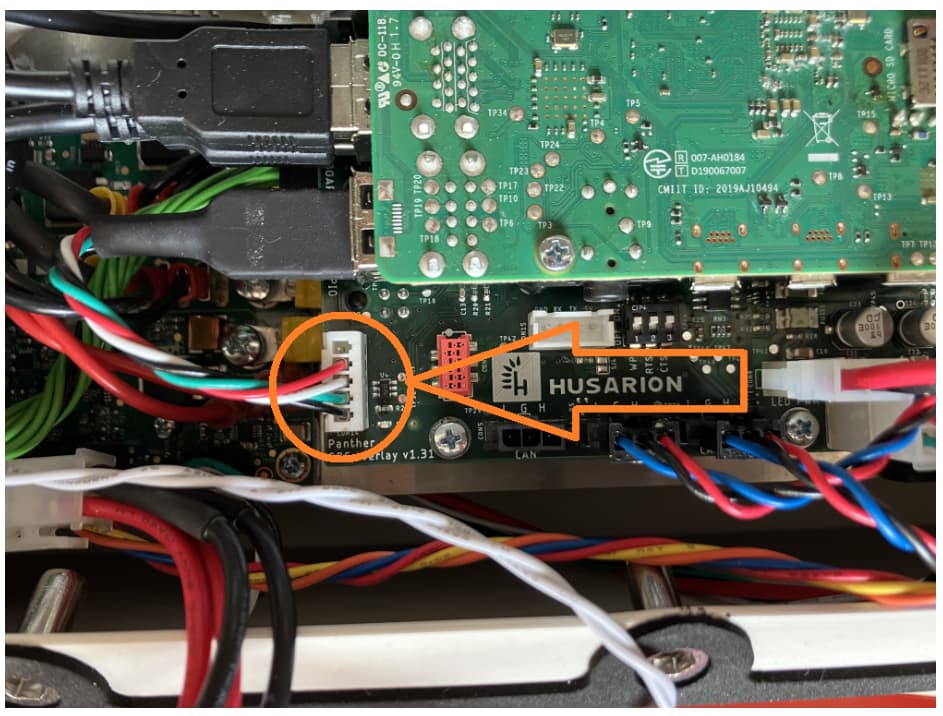
- Disconnect the following cable:
- Plug in the battery again and power on the robot.
- Run the following command in the terminal: sudo hw_uccb_update. Please note that this script will flash the new firmware to the Overlay board. The firmware is already included in the Built-In OS image. This operation is required for all robots with Overlay version >=1.30. You can verify your version by using the command: echo $ROBOT_SBC_OVERLAY_VERSION.
- Turn off the robot again.
- Reconnect the white plug.
- Turn on the robot and verify that the issue has been resolved by checking the output of the
ifconfigcommand. It should listrobot_can, and your container configuration should run correctly. - Close the cover (disconnecting the battery is recommended) and secure the battery with screws, if applicable.
If this doesn’t help, please send me som logs:
sudo systemctl status robot_can_setup.serviceorsudo systemctl status panther_can_setup.servicesudo journalctl -u panther_can_setup.servicesudo dmesg | grep can