Panther wheel custom

Hi there,

I can see on Github in the ugv_husarion_ros a launch argument for wheel_type which could be custom. If we were to install specific mecanum wheels (not among the listed wheels) on the Panther, what would be the files modification required? So far I can see:

  • adding a WHCustom_controller.yaml in the husraion_ugv_ros/husarion_ugv_controller/config, if using mecanum wheel copying and adapting the WH02 file
  • addint the wheel representation in a WH custom folder in the husraion_ugv_ros/husarion_ugv_description/meshes
  • making sure these modifications are launching correctly on the built-in computer

Would there be any modifications required either in the repository or at wheel motor driver level?

Thank you,

Nicolas

Hi @Nico2025,
Your information is correct. The only difference is that to avoid problems with selecting custom for the wheel_type argument, the files should be named:

  • custom_controller.yaml
  • custom.yaml

I’ll rewrite what you described step by step as a universal guide for future users.

  1. Add custom_controller.yaml to the husarion_ugv_controller package. Fill it in based on the remaining files. Adjust the key parameters:

    • wheel_separation
    • wheel_radius
    • wheel_separation_multiplier
    • max_velocity
    • min_velocity
    • (optional) twist_covariance_diagonal
  2. Add custom.yaml to the husarion_ugv_description package.
    Fill it in based on the remaining files. Adjust all parameters to match the actual situation. These parameters are primarily related to the robot’s visualization in RViz and simulation. If this isn’t important, you can choose them, just make a rough estimate.

  3. Add the mesh in the husarion_ugv_description package. This also involves visualization.

  4. During launch, add the wheel_type:=custom argument

ros2 launch husarion_ugv_bringup bringup.launch.py robot_model:=<robot_model> wheel_type:=custom

Regarding the modifications themselves, I think the fastest way would be to modify the files in compose.yaml itself using volumens. However, remember that new files should be added to the install folder, not the src folder.

Hi,

So far what I understand is that when you install the built-in computer OS (using Operating System Reinstallation | Husarion), the OS on the SD card executes a docker container via the ~/compose.yaml . The docker compose.yaml file executes:

ros2 launch husarion_ugv_bringup bringup.launch.py
common_dir_path:=/config
launch_gamepad:=true

So, assuming I would have done the required modification in the container, I could modify the compose.yaml file ros2 launch option to get the custom wheels by adding

wheel_type:=custom

is that correct?

I have installed the last OS humble image available

uname -a
Linux husarion 6.8.4-rt11-raspi #5 SMP PREEMPT_RT Tue Jun 18 13:14:03 UTC 2024 aarch64 aarch64 aarch64 GNU/Linux
docker images
REPOSITORY              TAG                     IMAGE ID       CREATED         SIZE
husarion/husarion-ugv   humble-2.2.2-20250702   0992abbd81c4   10 months ago   2.19GB

Now, to modify the actual files required, within the docker image, you have to modify the files to add a custom wheel. I tried to modify the container files (via vscode dev container remote access), but the files in the install folder are symbolic links, so copying and pasting an existing WH02_controller.yaml from there then edit it via the symbolic link would modify WH02 simultaneously (which is not desired). So I created some files in the src folder by copying existing wheels and then copied them over to the install folder.

I also tried to modify the source files, but when getting into the running image, I cannot run colcon to build the src files modifications (after using docker exec -it husarion_ugv_ros /bin/bash).

So I have the impression that the changes I do to the image are not taken into account. What would be the more in detail process to follow? Do I need to regenerate a full docker image based on the husarion_ugv_repo GitHub - husarion/husarion_ugv_ros: ROS package for Panther and Lynx mobile robots · GitHub and if so could you specify the step by step process?

How would I be able to verify that the robot has now the new custom wheels loaded correctly upon start up? I tried using rviz, and so far, the custom wheels never seem to have loaded, so not sure if I am not missing one step.

  • either the image is immutable .
  • or I need to rebuild the ros2_ws, but when I am in the image, I cannot run the colcon command.

Small other question in parallel, reading Robot Management and Configuration | Husarion as a potential alternate method to change the wheel type to an existing available wheel WH0X, are you supposed to run the configurator TUI from the built in computer itself or from a user computer? The docs indicate

ssh husarion@10.15.20.3

which is the default ip address for the user computer and the user name of the built in computer, so I am a bit confused.

Thank you,

Nicolas
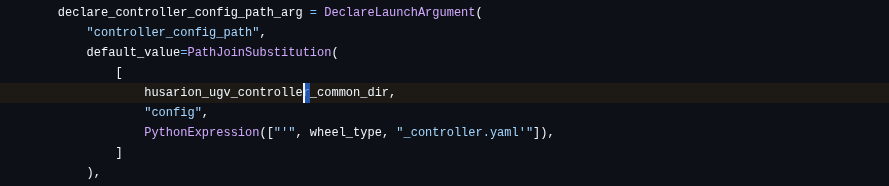
Code example:

You should add to compose.yaml:

  volumes: 
    - <wheel_controller_config.yaml>:/ros2_ws/install/husarion_ugv_controller/share/husarion_ugv_controller/config/custom_controller.yaml
    - <wheel_description.yaml>:/ros2_ws/install/husarion_ugv_description/share/husarion_ugv_description/config/custom.yaml
# Additional / Optional
    - <wheel_meshes_folder>:/ros2_ws/install/husarion_ugv_description/share/husarion_ugv_description/meshes/<name_specified_in_wheel_description.yaml>

end of fille:

    command: >
      ros2 launch husarion_ugv_bringup bringup.launch.py
        common_dir_path:=/config
        launch_gamepad:=true
        wheel_type:=custom

Is this how you made changes? If something isn’t working, let me know right away. I may have forgotten something.

Other questions

  1. To verify, you can check the data in the parameters after running the ros2 driver.
    ros2 param get /panther/drive_controller wheel_radius (note: use ros2 humble distro to check param - build in computer is based on ubuntu 24.04 and have ros2 jazzy installed)
  2. The docker image does not contain build tools, you would have to install them.
  3. TUI Configurator is a tool that allows you to change parameters from any computer, including the user computer. However, it cannot add new wheel configurations.

Hi @RafalGorecki ,

still no luck, here is what I got so far:

  • I have put all indicated files in the install folder (in their respective packages share sub-folders) and it is still showing the original wheels. On my side I use vscode to first remotely access the built in computer and add the files in the image installed via the container dev extension and attach image to code editor. This is how I can add the two files + modify their code. But I have not done a colcon build as extra files are already installed in the install folder.
  • modified the compose file accordingly based on your last comment.
  • to do a test I restart the Panther via the power off then power on cycle. Should I try to just restart the image without the power cycle? If so, what would be the process?

The wheel diameter param check also indicates the WH01 radius (0.1825), so as if none of the modifications made had any impact.

Could you check the whole process on your side with a dummy custom wheel and let me know what may be missing. Do I need to build a new docker image, or can I just change the existing compose.yaml file and insert in the image the required files only (so far it does not seem to be working)?

Thank you,

Nicolas

Hi @Nico2025,

Controller

We’ll need to tweak the architecture a bit to make it work logically. Please add custom_controller.yaml to the ~/config/husarion_ugv_controller/config/ directory on the host.

It should then work. Instead of restarting the power, it’s faster and more reliable to restart the Docker image using the commands docker compose down and docker compose up.

Explanation

The controller has a dedicated argument, which would also need to be set to a path or added to ~/config.

Alternative

If that doesn’t work, there are also launch file arguments:

  • controller_config_path
  • wheel_config_path
    You could also pass and launch the files like this:
   volumes:
      - /run/husarion/robot_config.env:/run/husarion/robot_config.env
      - /run/husarion/robot_config.yaml:/run/husarion/robot_config.yaml
      - /run/dbus/system_bus_socket:/run/dbus/system_bus_socket
      - /sys/bus/iio/devices:/sys/bus/iio/devices:ro # Read-only access to IIO devices
      - ~/.ssh/id_rsa:/root/.ssh/id_rsa
      - /home/husarion/config:/config
      - /home/husarion/wheel_controiller.yaml:/custom_controiller.yaml
      - /home/husarion/wheel_description.yaml:/custom.yaml
    # Realtime hardware (https://control.ros.org/master/doc/ros2_control/controller_manager/doc/userdoc.html#determinism)
    ulimits:
      rtprio:
        soft: 99
        hard: 99
      memlock:
        soft: -1
        hard: -1
    command: >
      ros2 launch husarion_ugv_bringup bringup.launch.py
        common_dir_path:=/config
        launch_gamepad:=true
        controller_config_path:=/custom_controiller.yaml
        wheel_config_path:=/custom.yaml

Mesh

Regarding the mesh, I’m not sure why you’re not seeing the changes. Please try using available meshes, such as WH02, to see if it takes this file into account. Restart Docker using the commands docker compose down & docker compose up.
Use the WH02.yaml file as a base. The wheels should change to mecanum. Then modify folder_path it the change of the wheel is visible.

In future

In a future release, we’ll probably add an empty file:

  • custom_controller.yaml
  • custom.yaml
    directly on the host, so you don’t have to mess around with Docker. In such scenario user simply edit 2 files and add wheel_type:=custom arg

Hi @RafalGorecki ,

I did not manage to get the first method suggested to work, but the alternative one worked:

volumes:
  - /run/husarion/robot_config.env:/run/husarion/robot_config.env
  - /run/husarion/robot_config.yaml:/run/husarion/robot_config.yaml
  - /run/dbus/system_bus_socket:/run/dbus/system_bus_socket
  - /sys/bus/iio/devices:/sys/bus/iio/devices:ro # Read-only access to IIO devices
  - ~/.ssh/id_rsa:/root/.ssh/id_rsa
  - /home/husarion/config:/config
  - /home/husarion/custom_controller.yaml:/custom_controller.yaml
  - /home/husarion/custom.yaml:/custom.yaml

command: >
  ros2 launch husarion_ugv_bringup bringup.launch.py
    common_dir_path:=/config
    launch_gamepad:=true
    controller_config_path:=/custom_controller.yaml
    wheel_config_path:=/custom.yaml

And you have to manually put on the host (built-in computer) in /home/husarion the files custom_controller.yaml and custom.yaml (description of wheels).

Once I had this running, the rviz2 shows the WH02 wheel (as I used them for description) and I can read the custom wheel radius being set correctly via: ros2 param get /panther/drive_controller wheel_radius

Thank you for your help,

Nicolas

I’m glad we managed to change this parameter. I’ll use this experience as feedback and try to make wheel modifications easier to handle.