I am currently running on a raspberry pi 4 the ROS2 Humble installation with a ROSbot 2R I ran these commands:
as instructed from here but the topic /camera/depth topic won’t show up when I run ros2 topic list. I have also gone to check the parameters and the depth is set to false, but when I activate it and try to restart the robot it returns back to false. If there is a step I am missing or if anyone has any tips, please let me know! I am also happy to provide any additional information if requested.
Hello @etanwill,
Please provide your OS version: echo $HUSARION_OS_VERSION
Hello @RafalGorecki Thank you for the response!
Here is that command:
husarion@husarion:~$ echo $HUSARION_OS_VERSION
husarion-ros2-humble-rpi-2025-07-29
Thank you for the information. Okay, you have the latest image for ROSbot 2R, which is based on snaps (ROS nodes running in snap).
I suggest first checking the following list:
-
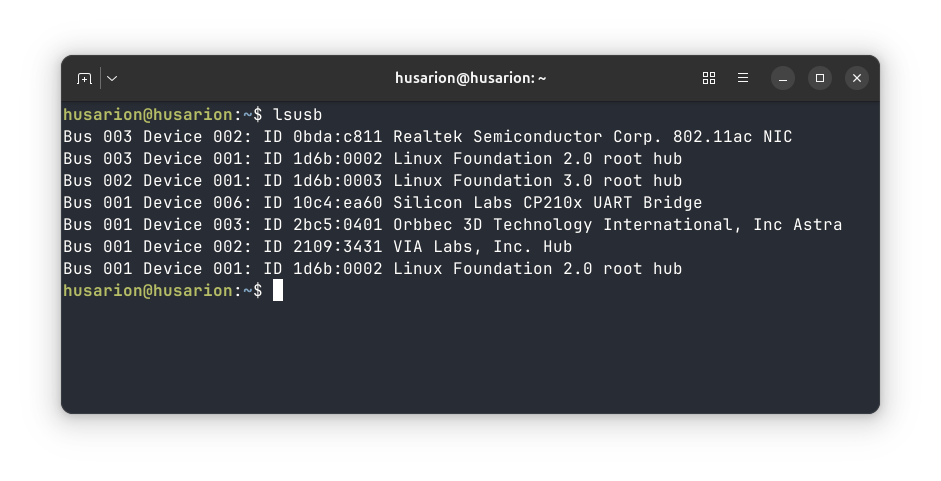
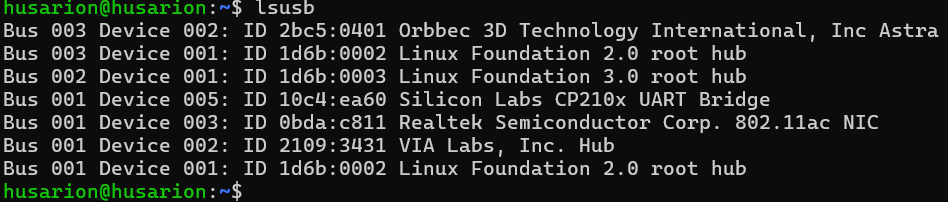
Are device visible
-
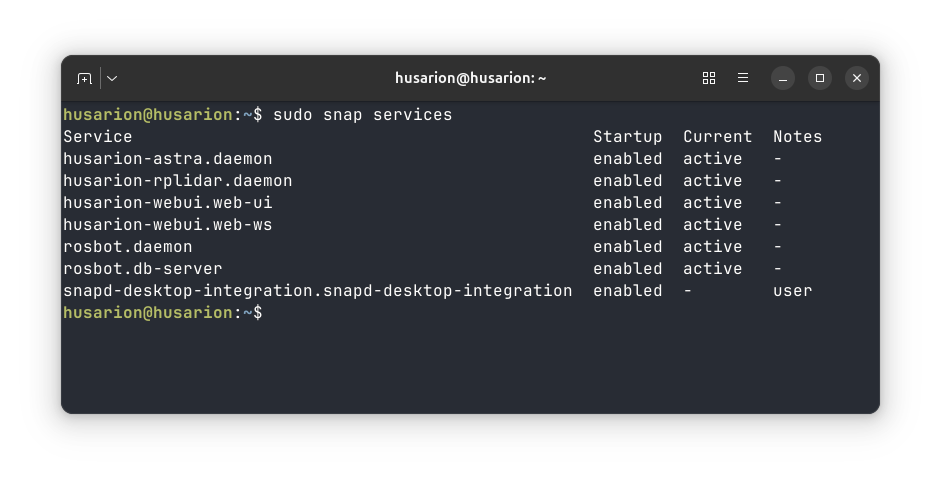
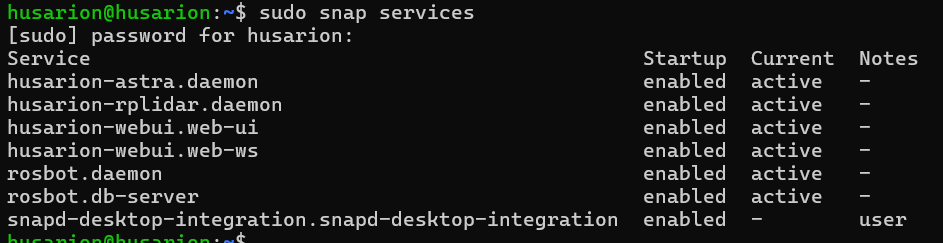
Are snaps active?
-
Get logs
sudo snap logs husarion-astra -n 150 # -n, show only the given number of lines
suggestion unrelated to the topic
I also suggest to change default middleware configuration. By default factory_reset.sh setup paremeter ros.transport to udp-lo - localhost. By default, however, ros2 supports multicast, so ros.transport should be rather set to udp by default.
sudo snap set <snap_name> ros.transport=udp
Here are the screen shots for your first 2 instructions. I didn’t notice anything out of the ordinary with them but maybe I have been overlooking something:
I also did your 3rd step and just took the parts from today 02/05/2026. I see in these logs that it says depth is not enabled like I had mentioned previously I just have no idea how to get it to remain enabled or get it to start when I enable it at the command line. Here are those logs:
2026-02-05T14:59:11-05:00 husarion-astra.daemon\[1585\]: Running with options: params_file:=/var/snap/husarion-astra/common/camera-params-default.yaml ffmpeg_params_file:=/var/snap/husarion-astra/common/ffmpeg-params-default.yaml device_namespace:=camera
2026-02-05T14:59:22-05:00 husarion-astra.daemon\[3606\]: \[INFO\] \[launch\]: All log files can be found below /root/snap/husarion-astra/6/ros/log/2026-02-05-14-59-22-160708-husarion-3606
2026-02-05T14:59:22-05:00 husarion-astra.daemon\[3606\]: \[INFO\] \[launch\]: Default logging verbosity is set to INFO
2026-02-05T14:59:22-05:00 husarion-astra.daemon\[3606\]: \[INFO\] \[astra_camera_node-1\]: process started with pid \[3923\]
2026-02-05T14:59:38-05:00 husarion-astra.daemon\[3606\]: \[astra_camera_node-1\] Warning: class_loader.impl: SEVERE WARNING!!! A namespace collision has occurred with plugin factory for class rclcpp_components::NodeFactoryTemplate<astra_camera::OBCameraNodeFactory>. New factory will OVERWRITE existing one. This situation occurs when libraries containing plugins are directly linked against an executable (the one running right now generating this message). Please separate plugins out into their own library or just don’t link against the library and use either class_loader::ClassLoader/MultiLibraryClassLoader to open.
2026-02-05T14:59:38-05:00 husarion-astra.daemon\[3606\]: \[astra_camera_node-1\]          at line 253 in /opt/ros/humble/include/class_loader/class_loader/class_loader_core.hpp
2026-02-05T14:59:38-05:00 husarion-astra.daemon\[3606\]: \[astra_camera_node-1\] \[INFO\] \[1770321578.975915092\] \[camera.camera\]: init done.
2026-02-05T14:59:38-05:00 husarion-astra.daemon\[3606\]: \[astra_camera_node-1\] \[INFO\] \[1770321578.981284434\] \[camera.camera\]: Waiting for device connection…
2026-02-05T14:59:38-05:00 husarion-astra.daemon\[3606\]: \[astra_camera_node-1\] \[INFO\] \[1770321578.981582061\] \[device_listener\]: Found 1 devices
2026-02-05T14:59:39-05:00 husarion-astra.daemon\[3606\]: \[astra_camera_node-1\] \[INFO\] \[1770321578.981682709\] \[camera.camera\]: Trying to open device: 2bc5/0401@3/2
2026-02-05T14:59:39-05:00 husarion-astra.daemon\[3606\]: \[astra_camera_node-1\] \[INFO\] \[1770321579.389014259\] \[camera.camera\]: Device connected: Astra serial number: AADA233002Y
2026-02-05T14:59:39-05:00 husarion-astra.daemon\[3606\]: \[astra_camera_node-1\] \[INFO\] \[1770321579.389200480\] \[camera.camera\]: starting device
2026-02-05T14:59:39-05:00 husarion-astra.daemon\[3606\]: \[astra_camera_node-1\] \[INFO\] \[1770321579.522968385\] \[camera.camera\]: depth is not enable
2026-02-05T14:59:39-05:00 husarion-astra.daemon\[3606\]: \[astra_camera_node-1\] \[INFO\] \[1770321579.523123087\] \[camera.camera\]: ir is not enable
2026-02-05T14:59:42-05:00 husarion-astra.daemon\[3606\]: \[astra_camera_node-1\] \[INFO\] \[1770321582.840737163\] \[FFMPEGEncoder\]: enc: libx264 prof:  preset: ultrafast
2026-02-05T14:59:42-05:00 husarion-astra.daemon\[3606\]: \[astra_camera_node-1\] \[INFO\] \[1770321582.841380231\] \[FFMPEGEncoder\]: qmax: 10 bitrate: 8242880 gop: 15
2026-02-05T14:59:43-05:00 husarion-astra.daemon\[3606\]: \[astra_camera_node-1\] \[INFO\] \[1770321583.126299463\] \[camera.camera\]: set color video mode Resolution :320x240@30Hz
2026-02-05T14:59:43-05:00 husarion-astra.daemon\[3606\]: \[astra_camera_node-1\] format
2026-02-05T14:59:43-05:00 husarion-astra.daemon\[3606\]: \[astra_camera_node-1\] \[INFO\] \[1770321583.195976077\] \[camera.camera\]: set color video mode Resolution :320x240@30Hz
2026-02-05T14:59:43-05:00 husarion-astra.daemon\[3606\]: \[astra_camera_node-1\] format
2026-02-05T14:59:43-05:00 husarion-astra.daemon\[3606\]: \[astra_camera_node-1\] \[WARN\] \[1770321583.195980428\] \[camera.camera\]: Publishing dynamic camera transforms (/tf) at 10 Hz
2026-02-05T14:59:43-05:00 husarion-astra.daemon\[3606\]: \[astra_camera_node-1\] \[ERROR\] \[1770321583.197530433\] \[camera.camera\]: Enabling image registration mode failed:
2026-02-05T14:59:43-05:00 husarion-astra.daemon\[3606\]: \[astra_camera_node-1\]    Device.setProperty(5) failed
2026-02-05T14:59:43-05:00 husarion-astra.daemon\[3606\]: \[astra_camera_node-1\]
2026-02-05T14:59:43-05:00 husarion-astra.daemon\[3606\]: \[astra_camera_node-1\]
2026-02-05T14:59:43-05:00 husarion-astra.daemon\[3606\]: \[astra_camera_node-1\]
2026-02-05T14:59:43-05:00 husarion-astra.daemon\[3606\]: \[astra_camera_node-1\] \[INFO\] \[1770321583.576567102\] \[camera.camera\]: color is started
2026-02-05T14:59:43-05:00 husarion-astra.daemon\[3606\]: \[astra_camera_node-1\] \[INFO\] \[1770321583.577245688\] \[camera.camera\]: device  started.
Thank you for the help!
Okay, I think I understand what’s going on. Snap has depth image disabled by default. To change this, you need to change the configuration file.
Please change the Snap configuration using:
sudo snap set husarion-astra driver.camera-params=depth-color
If you could also edit the configuration, edit the file (restart required):
/var/snap/husarion-astra/common/camera-params-depth-color.yaml
I hope this will solve the problem.
This fix worked thank you very much!